A complete downhill BMX run in your browser
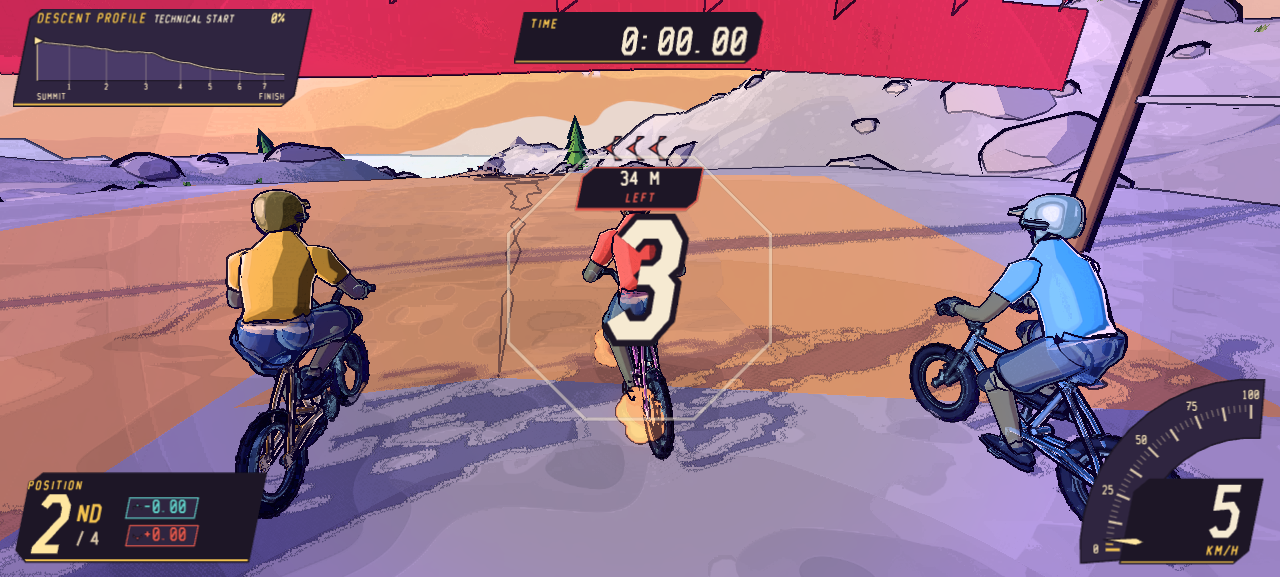
This is a point-to-point mountain race rather than an endless runner. Four riders leave the summit together and follow the same cel-shaded trail toward the valley. The course mixes fast open sections with narrower turns, checkpoint gates and shaped jumps, so a good run asks for more than holding the pedal key. You need to choose a usable line, keep the bike settled and decide when a trick is worth the risk.
The race, scoring system and results screen are part of the playable build on this page. Your position changes as the other riders move, the timer continues until the finish, and landed tricks add to a separate score. A boost meter gives successful riding an immediate payoff, while checkpoint splits make it easier to see where a run improved or fell apart.
Playlane hosts the files directly, so pressing the play button keeps the session on this site. There is no account, installer or publisher handoff. If you prefer more space, the standalone route opens the same build in a larger view; it does not send you to another game portal.
What happens during a downhill run
Every attempt follows the same mountain, but the combination of racing, airtime and mistakes makes each finish different. Learning the course matters: the safest line is not always the fastest one, and the biggest jump is not always the best place to spend a full trick combination.
Race three moving rivals
You are one of four riders on the trail. The position display reacts to real progress rather than a fixed target, so a clean corner or quick recovery can change the order before the next checkpoint.
Read the terrain before jumping
Rises, drops and lips affect the bike differently. Pedal on stable ground, line up before a narrow section and preload as you approach a clear takeoff. Turning sharply at the edge usually costs more speed than it saves.
Trade airtime for trick points
A short hop may only leave room for a small movement. Longer gaps give you time for spins, flips or bike tricks, but points count only when the landing is controlled. A crash can erase the advantage of an ambitious attempt.
Finish, review and try again
The results screen compares position, finish time and trick score. It also shows run goals and replays the biggest-air moment, giving you a practical reason to race again instead of guessing what to improve.
How to play Airborne BMX
The controls separate ground speed, bike balance and trick inputs. Start with steering and jumping, then add one trick at a time. Trying every key on the first descent usually makes the bike harder to read.
- 01
Load the race
Press the main play button once and wait for the status below the player to say the game is ready. Click inside the game before using the keyboard. Reload game restarts the embedded build if the frame stops responding.
- 02
Build speed on the ground
Use W or ↑ to pedal. Steer with A/D or the left and right arrows, and use S or ↓ when you need to reduce speed before a tight approach. Small steering corrections preserve more momentum than last-second turns.
- 03
Preload before a takeoff
Hold Space as the bike approaches a lip, then release near the edge. The timing changes the jump: releasing too early wastes the preload, while waiting too long can send the bike off balance. Practice on obvious ramps before using it on uneven ground.
- 04
Add a trick in the air
Use J and K to control lean. Shift and E, combined with a direction, trigger the available trick inputs. The build includes moves such as 360s, frontflips, backflips, tabletops, supermans, tailwhips, no-footers and manuals. Leave enough time to bring the bike back for landing.
- 05
Spend boost on a clean exit
Landed tricks help fill the boost meter. Press F when the bike is stable and the trail ahead is readable. Boost is most useful after a landing or on a straighter section; firing it into a sharp turn can turn extra speed into an avoidable crash.
Scoring, boost and run goals
Race position and trick score are related, but they are not the same objective. You can reach the finish with a modest score by riding cautiously, or collect more points while losing time in the air. A balanced run needs enough speed to stay with the field and enough control to land deliberate tricks.
The current results screen tracks four clear goals. Complete the run, land at least one trick, reach 2,500 trick points and finish on the podium. These goals use events the game already measures; they are not a separate campaign or a claim about unlockable worlds. A new player can focus on finishing first, then add score and position targets after the route becomes familiar.
After a completed descent, the replay window shows the biggest-air moment. The game can also keep a best-run ghost in local browser storage, letting a later attempt compare its pace with the saved line. That reference stays on the same device and browser profile. Clearing site data may remove it.
How to finish more consistently
Look beyond the front wheel
Watch the shape of the next section instead of reacting only to the bike. Early line choices leave room for gentle steering; late corrections create sideways landings and lost speed.
Separate racing practice from trick practice
Use one run to learn corners and checkpoint order. On the next attempt, choose one or two jumps for tricks. This makes it easier to tell whether a slower time came from the route, the stunt or the landing.
Use smaller tricks when airtime is uncertain
A completed move is more useful than a large unfinished rotation. If the landing arrives sooner than expected, release the trick input, level the bike and protect the run.
Save boost until the bike is settled
The boost meter is tempting as soon as it fills, but timing matters. A straight run-out gives the extra speed somewhere to go. A narrow landing zone does not.
Compare one result at a time
When the race ends, pick a single target for the retry: a faster finish, a podium place, fewer crashes or a higher trick score. Chasing every number at once makes improvement harder to recognize.
Browser requirements and play options
The game uses WebGL for its 3D course and is designed around a physical keyboard. A current desktop version of Chrome, Edge, Firefox or Safari is the safest choice. Close unusually heavy tabs if the frame stutters, keep hardware acceleration enabled when your browser supports it, and use Theater mode or Fullscreen when the embedded view feels too small.
Mobile play is not presented as a supported experience because the complete control set has not been verified on touch-only devices. The homepage itself remains responsive, but the race is best played on a desktop or laptop. If loading fails, use Reload game once; if that does not help, refresh the page and confirm that WebGL is available in the browser.
No registration is required. The player loads only after a click, and the self-hosted build does not open another publisher page. Local diagnostics record a small set of readiness and input events on the device so the site can distinguish a working player from an empty frame; they are not a Playlane account or a public leaderboard.
Common questions about the game
Can I play Airborne BMX online?
Yes. Airborne BMX opens inside this Playlane page after you press Play. A dedicated game page is also available for a larger view.
What are the BMX controls?
Pedal with W or Up, steer with A/D or Left/Right, preload with Space, brake with S or Down, and use J/K, Shift and E for balance and tricks. Press F to use boost.
Do I need to download the game?
No. The complete browser build loads after you press Play. It is hosted on Playlane and does not require an installer, account or publisher redirect.
How does the trick score work?
Completed airborne moves add to the trick score after a controlled landing. Bigger combinations can score more, but an unfinished rotation or crash can cost time and break the run.
What are the run goals?
The results screen checks four goals: complete the course, land a trick, reach 2,500 trick points and finish in the top three.
Does the game save progress?
There is no account or campaign save. When browser storage is available, the game can keep a local best-run ghost for pace comparison. Clearing site data may remove it.
Does it work on mobile?
The game is designed for desktop keyboard and WebGL first. Touch-only play has not been verified, so use a desktop or laptop browser for the supported experience.